

In late January 2023, Singapore Airlines became the first carrier in Asia to offer unlimited free Wi-Fi to its Business Class passengers, following a five-month long trial across all its wide-body and Boeing 737 MAX aircraft.
It’s a significant shift from the airline in a few short years, with a 100MB connection costing a whopping US$23 (over S$30) back in 2018, 28% more than low-cost subsidiary Scoot was charging!
Thankfully there have been progressively expanded free allowances and reduced costs rolled out since then.
Most importantly, if you’re flying in Suites, First or Business Class, or are a PPS Club member or supplementary cardholder, there’s no longer any concern about costs on Wi-Fi equipped aircraft in the fleet, with a full-flight unlimited connection on offer.
Which aircraft have Wi-Fi?
All Singapore Airlines aircraft, with the exception of a small fleet of seven Boeing 737-800s, have high-speed Wi-Fi capability.
| Singapore Airlines Fleet Wi-Fi Capability |
||
| Aircraft Type | Wi-Fi? | System |
| A350 Long Haul |  |
Panasonic Ku-band |
| A350 Medium Haul | |
GX Ka-band (SITAOnAir) |
| A350 ULR | |
Panasonic Ku-band |
| A380 | |
GX Ka-band (SITAOnAir) |
| 737-800 |  |
n/a |
| 737-8 MAX | |
Panasonic Ku-band |
| 777-300ER | |
GX Ka-band (SITAOnAir) or Panasonic Ku-band |
| 787-10 | |
Panasonic Ku-band |
Complimentary access plans
Here’s a summary of the latest fleet-wide complimentary Wi-Fi allowances, based on your cabin class and frequent flyer status.
| Singapore Airlines Complimentary Wi-Fi Allowance |
|||
| PPS Club Member* |
KrisFlyer Member |
Non-KrisFlyer Member |
|
| Suites First Class Business Class |
Unlimited free Wi-Fi |
||
| Premium Economy Class |
Unlimited free Wi-Fi | 3-hour Surf Plan |
None |
| Economy Class | Unlimited free Wi-Fi | 2-hour Surf Plan |
None |
* Includes supplementary cardholders
Non-KrisFlyer members in Premium Economy or Economy Class are now the only ones without a complimentary connection on the vast majority of SIA flights, though it’s free to join the programme, and a range of paid connection packages remains available once any free allowance is used up.

Note that SIA does not permit video streaming and calls in-flight.

Wi-Fi fees
Once you have used any complimentary Wi-Fi allowance on board a Singapore Airlines flight, the following regular time-based packages are available for purchase.
| Singapore Airlines Wi-Fi Plans |
||
| Package | Cost | Description |
| 1 hour Surf Plan |
US$3.99 | 1 hour of continuous Wi-Fi access. Countdown begins after payment and will expire after the time limit is up, regardless of usage. Plan cannot be paused. |
| 3 hour Surf Plan |
US$8.99 | 3 hours of continuous Wi-Fi access. Countdown begins after payment and will expire after the time limit is up, regardless of usage. Plan cannot be paused. |
| Full Flight Surf Plan |
US$15.99 | Unlimited connection for the entire flight. |
These represent a far simplified series of time-based options compared to the previous data limit plans, whereby costs could soon add up, particularly for data-intensive users on long flights.
The “Full Flight” option could be particularly useful for those without unlimited complimentary access, but who still need to remain productive during their journey.

For perspective, back in 2019 US$15.99 would get you only a 200MB Wi-Fi allowance, and in 2018 it got you only 60MB! Now it’s an unlimited plan in terms of both time and data. How things have changed!
How to connect
If you are planning to use a complimentary allowance based on your KrisFlyer or PPS Club status (e.g. when flying in Premium Economy or Economy Class), your membership details will need to be added to your booking via the Manage Booking portal, or at the check-in desk, prior to boarding.
The Wi-Fi system is usually activated above 10,000ft, but sometimes you won’t be able to establish a connection until the aircraft has reached cruising altitude, around 20 minutes after takeoff.
Enable Wi-Fi on your device and connect to the KrisWorld network.

The KrisWorld portal will then load automatically, but if it doesn’t – navigate to kw.sq.com.

Click ‘Wi-Fi Portal’ and then select either ‘Complimentary Access’ or ‘Select a Price Plan’ as applicable.

You may also have been provided with a Promo Code for complimentary Wi-Fi from Singapore Airlines, in which case you can enter it here instead of selecting one of the paid access options.
If you are connecting to complimentary Wi-Fi, your session will be activated by entering your name and seat number. For a paid plan, your credit card payment will then be collected.
Once connected, the portal will show flight time remaining and the duration of your Wi-Fi session remaining, if applicable.

Which system is fastest?
The Global Xpress (GX) Ka-band systems by SITAOnAir are the fastest – fitted to the airline’s:
- Airbus A350 Medium Haul
- Airbus A380
The system also made its way onto the airline’s older 777-300ERs (9V-SWA to 9V-SWT) that were retrofitted from the much slower SwiftBroadband (SBB) L-band system from late 2017.
As far as the rest of the 777-300ER fleet is concerned though, 9V-SWU onwards (including 9V-SNA to -SNC) came factory-fitted with the Panasonic system, starting in mid-2013.
Fun fact: Singapore Airlines was the first airline in the world to install the GX Aviation Ka-band Wi-Fi system on a passenger aircraft with the initial A380 Version 3 delivery, and on 17th December 2017 passengers on 9V-SKU’s inaugural flight to Sydney were treated to an unlimited connection to try it out.Even with close to 100% of passengers using the system concurrently, fast speeds were reported.
The Panasonic Ku-band system fitted to the rest of the fleet uses a lower frequency range (12 to 18 GHz) than Ka-band (26.5 to 40 GHz), which means a reduced data transfer rate, but still provides good speeds.

We have typically recorded download speeds of 7-9 Mbps using the GX system, while 4-5 Mbps is more typical with the Panasonic system, though both are a marked improvement on the old SBB L-band connection for those who remember the slow, unreliable experience on pre-retrofit 777-300ERs and older A380s (0.8 Mbps is the best we ever got on those!).

Various other factors also impact your on-board Wi-Fi connection speed, including geographical location, altitude, atmospheric conditions including the weather, and of course passenger usage.
All things being equal though – you should notice faster speeds on a GX-equipped aircraft, compared to Panasonic.

Global coverage
The Wi-Fi service relies on both a satellite connection and national authorisations when overflying certain countries.
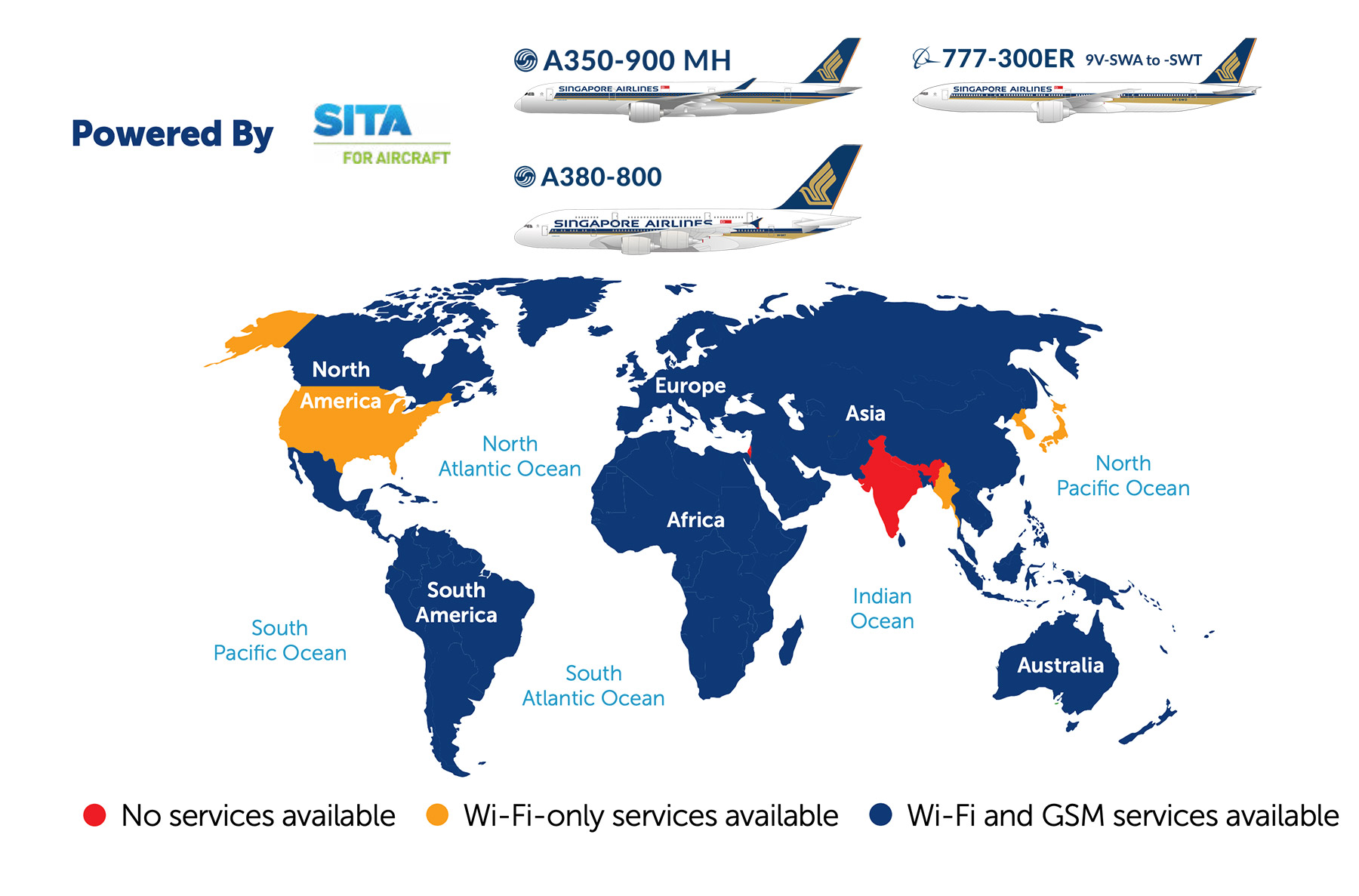
India is the main stumbling block on SIA’s network. The Panasonic system does now have authorisation for use in this airspace, though the SITAOnAir (GX Aviation) version does not, at the time of writing.
Here’s how the coverage looks depending on the Wi-Fi system installed, and therefore the aircraft type.
SITA OnAir (GX Aviation)
Global Coverage
Panasonic Avionics
Global Coverage

As you can see there will be a Wi-Fi outage period while overflying India on the way to Europe if you’re on an Airbus A380 or older Boeing 777-300ER (even though these have the fastest systems), but there is no outage on the Airbus A350 Long Haul or newer Boeing 777-300ERs on this route.
Additionally, there are two areas on SIA’s network that suffer from poor satellite coverage and therefore suffer from little to no connectivity:
- Polar regions
- South Indian Ocean
According to Singapore Airlines, this means you may encounter the following approximate Wi-Fi outage periods on selected flights:
- SQ478 SIN-JNB: Around 4h 45m into the flight, for around 1h 30m
- SQ479 JNB-SIN: Around 2h 45m into the flight, for around 1h 15m
- SQ22/24 SIN-EWR/JFK: Around 9h 30m into the flight, for around 2h 30m
- SQ21/23 EWR/JFK-SIN: Around 4h 30m into the flight, for around 2h 30m
Actual outage times and periods will depend on the exact routing your flight takes on the day.
Mobile data options
The three major telcos in Singapore continue to offer unlimited data packages for use with the Singapore Airlines onboard Wi-Fi.
There really seems little point to these packages any more, given that the maximum you can spend is US$15.99 (around S$21) for unlimited full-flight Wi-Fi, even if you get no free allowance whatsoever in your cabin class.
If you’re interested though, and flying on an equipped aircraft (i.e. all except the Boeing 737-800), available options are as follows:
 |
 |
 |
| S$29 | S$25 | S$25 |
| Valid for 24 hours from activation. | Valid for up to 24 hours, from 00:00 Singapore Time on the day of activation (GMT+8). | |
The packages cover multiple flights within your subscription window, so if you are taking two flights within 24 hours, you will be connected on both of them for a single fee, which is perhaps the only advantage over the on-board Wi-Fi purchase packages, which are only valid for one flight sector.
You will also be able to send and receive SMS messages when using this service, which some people may find useful.
Pro Tip: Note that with the StarHub and M1 packages, the unlimited data allowance will reset at midnight Singapore time, wherever you are in the world, which could mean being charged twice if you’re not careful.The connection and usage instructions for mobile data connections are available on the Singapore Airlines website here.
Summary
SIA’s Wi-Fi offering and pricing has come on leaps and bounds over the last five years or so.
It’s amazing to think that in January 2019 the airline was charging Business Class passengers US$15 to top up their 30MB free allowance by a measly 60MB, but just four years later is now offering unlimited full-flight Wi-Fi practically fleet-wide to these passengers.
Indeed the airline has become the first in Asia-Pacific to offer unlimited free Wi-Fi in Business Class on international flights.
Only those flying on the carrier’s small fleet of Boeing 737-800s now suffer from a lack of in-flight connection.
Further details of SIA’s inflight Wi-Fi service are available here.
(Cover Photo: Singapore Airlines)
Can you elaborate on exactly what video streaming consists of? It means different things to different people.
Thanks
“ The SITAOnAir (GX Aviation) system does now have authorisation for use in this airspace, though the Panasonic version does not, at the time of writing.”
– Looking at the graphics, it’s the opposite way around, right?:
The SITAOnAir (GX Aviation) system does not have authorisation for use in this airspace, though the Panasonic version does, at the time of writing.
Yes you’re right – got the two systems mixed up there in the text. The graphics are correct 👍🏼
Malaysia’s Celcom prepaid also works with Aeromobile (SQ’s in-flight mobile roaming provider). For RM98, you get 30 days of “unlimited” data roaming across 57 countries INCLUDING in-flight roaming.
I tested it out on my recent non-stop flights to/from JFK but connection was spotty and speeds slow (2Mbps was the fastest measured and there were long periods on no connection).
Can’t complain too much though because I considered the In-flight connection as a bonus to the data roaming in the US for which I bought the sim card for. This is a good option if you’re not in business class and need a connection throughout your long haul flight.
Do note that you have to activate the 30 day plan before take-off while you still have internet on the ground.
How come the 737 max doesn’t have the new faster KA-band WiFi if its the newest aircraft in the fleet?
I imagine this is down to when the contract for Wi-Fi provision was first signed with the manufacturer. The 787-10 also missed out on Ka band unfortunately, despite being introduced after the refitted A380 Version 3.
have you all tried the boingo wifi? does it still work? i tried on recent flight does not seems able to connect.
The Boingo option (e.g. via Citi prestige card) hasn’t worked on SQ flights for over a year now, maybe longer.