

Since the retirement of the airline’s Boeing 737-800 fleet in October 2025, Singapore Airlines has offered in-flight Wi-Fi across its entire fleet, with most passengers benefiting from an unlimited complimentary allowance for the whole flight.
The airline became the first carrier in Asia to offer unlimited free Wi-Fi to Business Class passengers in January 2023, following a five-month trial across its wide-body and newer narrow-body Boeing 737 MAX aircraft.
A few months later, KrisFlyer members in Premium Economy and Economy were added to the list, with their previous time-based packages upgraded to full in-flight free Wi-Fi from 30th June 2023.
It has been a significant shift in a few short years, with a 100MB connection costing a whopping US$23 (~S$30) back in 2018!
Looking ahead, SIA has confirmed Starlink as its new in-flight Wi-Fi provider, with installations beginning in early 2027 on selected aircraft, promising vastly faster speeds and gate-to-gate connectivity.
Here’s the latest rundown on your Wi-Fi connectivity options on board.
Which aircraft have Wi-Fi?
All Singapore Airlines aircraft have Wi-Fi capability, following the retirement of the carrier’s small Boeing 737-800 fleet in October 2025.
| Singapore Airlines Fleet Wi-Fi Capability |
||
| Aircraft Type | Wi-Fi? | System |
| A350 Long Haul |  |
Panasonic Ku-band |
| A350 Medium Haul | |
GX Ka-band (SITAOnAir) |
| A350 ULR | |
Panasonic Ku-band |
| A380 | |
GX Ka-band (SITAOnAir) |
| 737-8 MAX | |
Panasonic Ku-band |
| 777-300ER | |
GX Ka-band (SITAOnAir) or Panasonic Ku-band |
| 787-10 | |
Panasonic Ku-band |
These ex-SilkAir narrow-bodies were the last holdouts in the fleet without on-board connectivity, and their retirement means you’re now guaranteed Wi-Fi capability regardless of which SIA aircraft type is operating your flight, whether it’s a one-hour hop to Kuala Lumpur or the 18-hour marathon to New York.
Note that connectivity is not guaranteed on every individual flight – see the global coverage section later in the article for areas where service may be unavailable, and bear in mind that occasional technical issues can also affect availability on a given sector.
Complimentary access plans
Here’s a summary of the fleet-wide complimentary Wi-Fi allowances on Singapore Airlines, based on your cabin class and frequent flyer status.
| Singapore Airlines Complimentary Wi-Fi Allowance |
|||
| Travel Class |  PPS Club PPS ClubMember* |
 KrisFlyer KrisFlyerMember |
Non-KrisFlyer Member |
| Suites First Business |
Unlimited free Wi-Fi |
||
| Premium Economy |
Unlimited free Wi-Fi | None | |
| Economy | Unlimited free Wi-Fi | None | |
* Includes Solitaire PPS Club supplementary cardholders
This is a significant upgrade on the airline’s former complimentary three-hour or two-hour Surf packages previously offered to KrisFlyer members on longer flights, and don’t forget it’s free to join the KrisFlyer programme.
Pro Tip: Even if you redeemed miles for your flight in Premium Economy or Economy Class, and so won’t be accruing any miles for the trip, don’t forget to add the KrisFlyer membership details for all passengers on the booking, to benefit from free Wi-Fi on board.Only non-KrisFlyer members travelling in Premium Economy or Economy Class lack a complimentary Wi-Fi connection on board, and will have to use one of the airline’s paid options if they wish to be connected.

(Photo: Singapore Airlines)
Note that SIA does not permit video streaming (e.g. Netflix, YouTube) nor voice calls / video calls in-flight via the Wi-Fi connection, though that’s set to change on selected aircraft from 2027 with the rollout of Starlink.

Multiple devices
If you’re flying on an aircraft with the GX Ka-band (SITAOnAir) Wi-Fi system, you can only use the connection on one device at a time. It is possible to switch devices on the same plan, otherwise you must purchase a separate Wi-Fi plan if you need to connect multiple devices concurrently.
On aircraft with the Panasonic Ku-band Wi-Fi system, you can connect up to three devices simultaneously with your complimentary in-flight Wi-Fi plan in some cases, as shown in the following table.
| Singapore Airlines Wi-Fi Device Limit Panasonic Ku-band system |
|||
| PPS Club Member* |
KrisFlyer Member |
Non-KrisFlyer Member |
|
| Suites First Business |
3 |
||
| Premium Economy |
3 | 1 | n/a |
| Economy | 3 | 1 | n/a |
* Includes Solitaire PPS Club supplementary cardholders
Only those using complimentary Panasonic Wi-Fi plans can connect up to three devices simultaneously. All paid plans, or SITAOnAir connections, are limited to one device at a time.
If you’re a Suites, First, Business Class or PPS Club passenger and need to use a fourth device, you can simply enter the same name and seat number on it as one of your previous three devices. One of those existing connections will then be bumped off to free up a slot for the new device.
Common mistake: Mobile app
If you’re flying in Premium Economy or Economy Class, you’ll need to enter your PPS Club or KrisFlyer membership details when you book your flight, via Manage Booking, at the airport check-in kiosk, or at the check-in counter, in order to benefit from free unlimited Wi-Fi on board.
Do note that adding the trip to your SQ mobile app does not automatically capture your KrisFlyer details for the booking.
You can still be crediting your miles to a different FFP, or have no frequent flyer membership details tagged to the flight, even if ‘Add Trip’ is done while you are signed into the app!
If you have added your trip on the SQ mobile app, select the desired trip and click on ‘Manage Booking’. Click on ‘Add Passenger Details’ and add your KrisFlyer number under the ‘Frequent Flyer Details’ field if necessary.
Crediting miles to a different programme
If you’re a Star Alliance frequent flyer who wants to earn miles in your home programme (e.g. Aegean Miles+Bonus, United MileagePlus, Air Canada Aeroplan), but still benefit from free in-flight Wi-Fi, there is a way to have both.
The trick is known as FQTV/FQTS splitting, and is supported by Singapore Airlines.
During the booking process or via Manage Booking, enter your KrisFlyer number under the ‘Frequent Flyer Details’ field, then tick the box labelled “I want to earn miles on another frequent flyer programme”. You can then enter the membership number of the programme you actually want to credit miles to.
The KrisFlyer attachment unlocks complimentary Wi-Fi on board, while the secondary FFP field ensures your miles are credited to your preferred programme.
Alternatively, attach your preferred Star Alliance programme number to the booking as usual, then once on board, generate an access code (see below) using your KrisFlyer membership details via the in-flight portal.
It’s not too late once on board
If you forget to add your KrisFlyer membership details to your booking before the flight, all is not lost.
If you’re flying in Economy Class or Premium Economy Class, once Wi-Fi service is enabled, simply join the KrisWorldnetwork, then log in to kw.sq.com.

There is an option to enter your KrisFlyer membership details and generate an access code for unlimited complimentary Wi-Fi for the duration of the flight.

It’s a bit convoluted, but does at least mean you can access Wi-Fi even if you have forgotten to add your KrisFlyer membership details to your booking ahead of departure or at the check-in desk.
Similarly if you are not yet a KrisFlyer member, and you’re flying in Economy Class or Premium Economy Class, the steps are as follows:
- Connect to the KrisWorld network
- Click here to join KrisFlyer
- Select ‘Join KrisFlyer’ and complete the enrolment form
- Receive a Wi-Fi code instantly for an unlimited connection on the same flight
Wi-Fi fees
If you are travelling in Premium Economy or Economy Class but are not a KrisFlyer or PPS Club member, you won’t benefit from a free connection.
Instead, the following regular time-based packages are available for purchase.
| Singapore Airlines Wi-Fi Plans |
||
| Package | Cost | Description |
| 1 hour Surf Plan |
US$3.99 | 1 hour of continuous Wi-Fi access. Countdown begins after payment and will expire after the time limit is up, regardless of usage. Plan cannot be paused. |
| 3 hour Surf Plan |
US$8.99 | 3 hours of continuous Wi-Fi access. Countdown begins after payment and will expire after the time limit is up, regardless of usage. Plan cannot be paused. |
| Full Flight Surf Plan |
US$15.99 | Unlimited connection for the entire flight. |
These represent a far simplified series of time-based options compared to the airline’s former data limit plans, where costs could soon add up, particularly for data-intensive users on long flights.
The “Full Flight” option could be particularly useful for those without unlimited complimentary access, but who still need to remain productive during their journey (some SIA flights are almost 19 hours long!).

(Photo: Singapore Airlines)
For perspective, back in 2019 US$15.99 would get you only a 200MB Wi-Fi allowance, and in 2018 it got you only 60MB! Now it’s an unlimited plan in terms of both time and data.
How things have changed for the better!
A couple of points to note on the paid plans:
- Plans are non-refundable once purchased
- Time-based plans cannot be paused, with the countdown starting from the moment of payment regardless of usage
Crediting your miles to a different frequent flyer programme on the flight doesn’t necessarily mean you’ll need a paid plan, however – see our section above on FQTV/FQTS splitting for a workaround that still unlocks complimentary Wi-Fi.
If you encounter any issues with your purchased plan during the flight, the contact details for the two service providers are as follows:
- SITAONAIR: cs@sita.aero
- Panasonic: SIA.CustomerCare@Panasonic.aero
How to connect
If you are planning to use a complimentary allowance based on your KrisFlyer or PPS Club status (i.e. when flying in Premium Economy or Economy Class), your membership details will need to be added to your booking via the Manage Booking portal, or at the check-in desk, prior to boarding.
The Wi-Fi system is usually activated above 10,000ft, around 15 minutes after take-off, and remains available until approximately 15 minutes before landing.
Occasionally a connection may not be possible until the aircraft has reached its full cruising altitude, but equally we’ve been online by 6,000ft before, only 3-4 minutes after takeoff, so it’s worth a try!
Enable Wi-Fi on your device and connect to the KrisWorld network.

The KrisWorld portal will then load automatically, but if it doesn’t – navigate to kw.sq.com.

Click ‘Wi-Fi Portal’ and then select either ‘Complimentary Access’ or ‘Select a Price Plan’ as applicable.

You may also have been provided with a Promo Code for complimentary Wi-Fi from Singapore Airlines, in which case you can enter it here instead of selecting one of the paid access options.
If you are connecting to complimentary Wi-Fi, your session will be activated by entering your name and seat number. For a paid plan, your credit card payment will then be collected.
Once connected, the portal will show flight time remaining and the duration of your Wi-Fi session remaining, if applicable.

Do check though – on a recent SIN-BKK flight we took this announcement was made after takeoff, but the Wi-Fi worked fine!
Connection issues?
If you’re having trouble connecting, here are a few things SIA recommends trying:
- Ensure your VPN is turned off
- Forget and reconnect to the ‘KrisWorld’ network
- Manually enter an external website address (e.g. singaporeair.com) to trigger the portal
- Clear your cache and browsing history
- Restart your device
On iPhone, also try setting Safari as the default browser. On Android, try a different browser if the default one isn’t loading the portal.
For Apple iPhone users like us – on the GX Ka-band systems (e.g. A350 Medium Haul), restart your device always solves the problem in our experience!
Which system is fastest?
The Global Xpress (GX) Ka-band systems by SITAOnAir are the fastest – fitted to the airline’s:
- Airbus A350 Medium Haul
- Airbus A380
The system also made its way onto the airline’s older 777-300ERs (9V-SWB to 9V-SWT) that were retrofitted from the much slower SwiftBroadband (SBB) L-band system from late 2017.
As far as the rest of the 777-300ER fleet is concerned though, 9V-SWU onwards (including 9V-SNA to -SNC) came factory-fitted with the Panasonic system, starting in mid-2013.
Fun fact: Singapore Airlines was the first airline in the world to install the GX Aviation Ka-band Wi-Fi system on a passenger aircraft with the initial A380 Version 3 delivery, and on 17th December 2017 passengers on 9V-SKU’s inaugural flight to Sydney were treated to an unlimited connection to try it out.The Panasonic Ku-band system fitted to the rest of the fleet uses a lower frequency range (12 to 18 GHz) than Ka-band (26.5 to 40 GHz), which means a reduced data transfer rate, but still provides decent speeds.

(Photo: Plane’s Portrait Aviation Media / Malcolm Lu)
We have typically recorded download speeds of 7-9 Mbps using the GX system, while 4-5 Mbps is more typical with the Panasonic system.
Despite the difference, both are a marked improvement on the old SBB L-band connection for those who remember the slow, unreliable experience on pre-retrofit 777-300ERs and older A380s (0.8 Mbps is the best we ever got on those!).

Various other factors also impact your on-board Wi-Fi connection speed, including geographical location, altitude, atmospheric conditions including the weather, and of course passenger usage.
Temporary loss of connection can also occur on both systems, during satellite switching.
Both current SIA systems also suffer from significant ‘ping’ times (latency), the delay between requesting a webpage and receiving the response, which is why browsing on board can feel sluggish even when raw download speeds, ‘on paper’, aren’t terrible.
All things being equal though, you should notice faster speeds on a GX-equipped aircraft, compared to Panasonic.

(Photo: Joi Ito)
If you have a choice on your route, for example between an Airbus A350 Medium Haul and a Boeing 787-10 flight, and you’ll need to get some productive online work done during the journey, you might be better to choose the A350 MH flight (GX system) for a faster connection.
However, this is all set to change with the rollout of Starlink from 2027 on selected aircraft. More on that later in the article.
Global coverage
The Wi-Fi service relies on both a satellite connection and national authorisations when overflying certain countries.
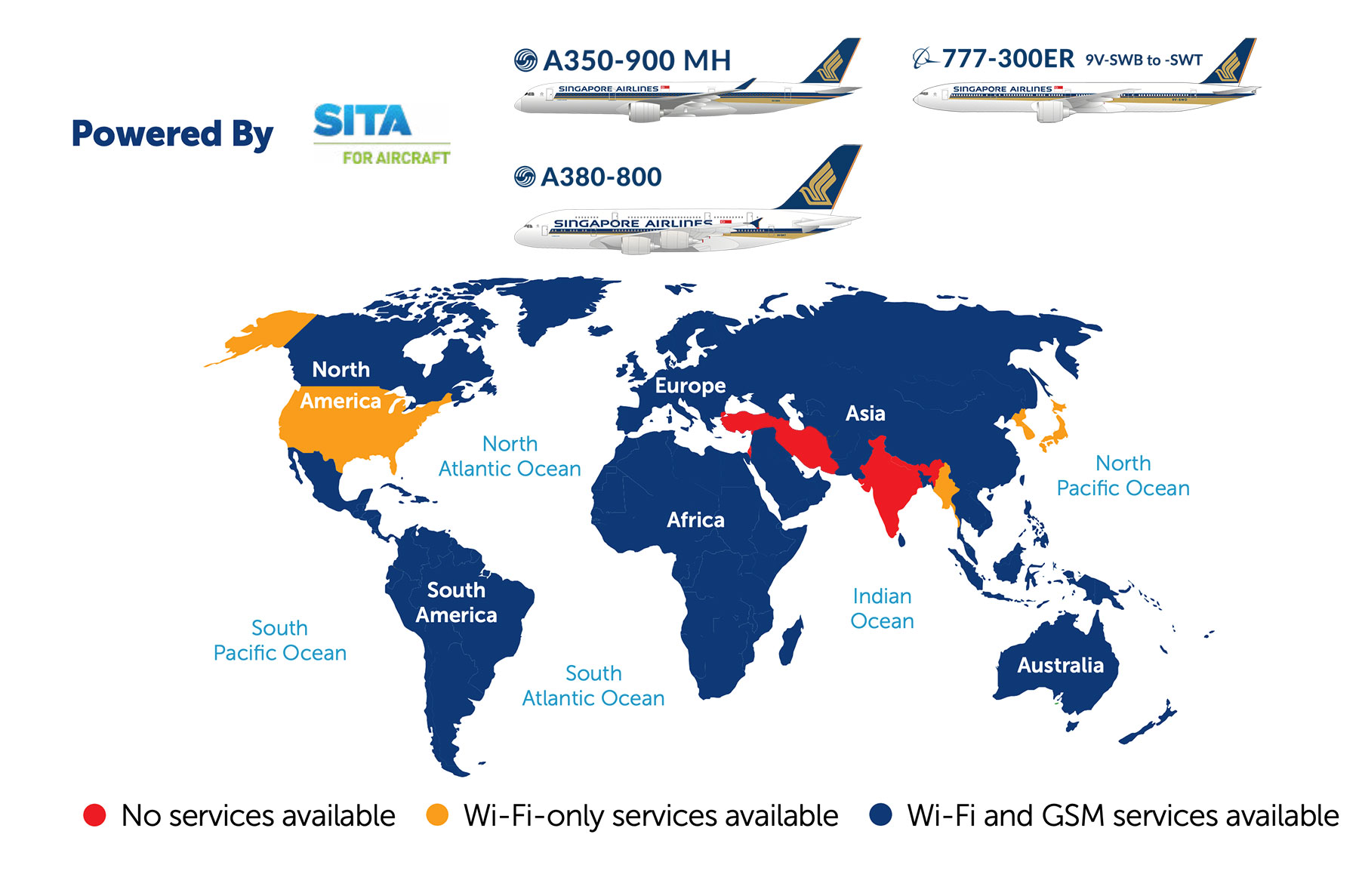
India is the main stumbling block on SIA’s network. The Panasonic system does now have authorisation for use in this airspace, though the SITAOnAir (GX Aviation) version does not, at the time of writing.
Here’s how the coverage looks depending on the Wi-Fi system installed, and therefore the aircraft type.
SITA OnAir (GX Aviation)
Global Coverage
Panasonic Avionics
Global Coverage

As you can see there will be a Wi-Fi outage period while overflying India, Iran and Turkey on the way to Europe if you’re on an Airbus A380 or older Boeing 777-300ER (even though these have the fastest systems), but there is no outage on the Airbus A350 Long Haul (yet!) or newer Boeing 777-300ERs on this route.
Singapore Airlines also lists the following countries as having no Wi-Fi authorisation system-wide, in addition to India, Iran and Turkey:
- Cuba
- Israel
- Lebanon
- North Korea
- Paraguay
- Syria
In practice this is academic for most SIA passengers, since these countries aren’t routinely overflown on the carrier’s current network.
Additionally, there are two areas on SIA’s network that have poor satellite coverage and therefore suffer from little to no connectivity:
- Polar regions
- South Indian Ocean
According to Singapore Airlines, this means you may encounter the following approximate Wi-Fi outage periods on selected flights:
- SQ478 SIN-JNB: Around 4h 45m into the flight, for around 1h 30m
- SQ479 JNB-SIN: Around 2h 45m into the flight, for around 1h 15m
- SQ22/24 SIN-EWR/JFK: Around 9h 30m into the flight, for around 2h 30m
- SQ21/23 EWR/JFK-SIN: Around 4h 30m into the flight, for around 2h 30m
Actual outage times and periods will depend on the exact routing your flight takes on the day.
In reality, Singapore – Newark / JFK flights are rarely using polar routes in either direction recently, due to Russian airspace restrictions, so they actually don’t currently suffer these long Wi-Fi outages.
Starlink coming from 2027
The big news for SIA in-flight connectivity is that the carrier has confirmed Starlink as its new Wi-Fi provider, with installations starting in Q1 2027 and a fleet rollout expected to wrap up by the end of 2029.

The rollout will deliver a dramatic step change in on-board connectivity, with speeds of up to 1 Gbps per antenna thanks to Starlink’s low Earth orbit satellite network, also meaning very low latency for the first time on SIA. That means video streaming, video calls, gaming, and large file uploads will all be possible, in stark contrast to the current Ku-/Ka-band systems.
Equally significant, Starlink will provide gate-to-gate connectivity rather than only working above 10,000 feet.
Starlink isn’t perfect though. Regulatory restrictions in Japan mean true gate-to-gate connectivity won’t work at the likes of Tokyo, Osaka and Nagoya, as LEO satellite Wi-Fi operation is blocked below 10,000ft.
Airspace over India also isn’t authorised for Starlink, creating a Wi-Fi blackout of around two hours each way on SIA’s Europe routes and about one hour each way on Middle East routes, even on A350 Long Haul aircraft that don’t currently suffer from this issue.
China is similarly off-limits for the service – on the ground or in the air!
Which aircraft are included?
Three aircraft types are confirmed for the Starlink refit:
| SIA Starlink Wi-Fi refits | |
| Aircraft Type | Starlink? |
| A350 Long Haul | Yes |
| A350 Medium Haul | No |
| A350 ULR | Yes |
| A380 | Yes |
| 737-8 MAX | No |
| 777-300ER | No |
| 787-10 | No |
The 777-300ER omission isn’t a huge surprise, since this fleet is on borrowed time and will be replaced by the brand new Boeing 777-9 from 2027, which we’d expect to arrive Starlink-equipped from the factory.
The exclusion of the 787-10, 737-8 MAX and A350 Medium Haul is more curious, since these are SIA’s regional workhorses and aren’t likely to be retired anytime soon. It does mean there will be a noticeable disparity in the connectivity experience depending on which aircraft will be operating your flight. Your trip to Tokyo, Mumbai or Sydney could be a Starlink experience or a Ku-band one, depending on the metal.
Pricing and access
Starlink will be free for all SIA passengers, however the existing KrisFlyer membership requirement for Premium Economy and Economy passengers is being retained.
That’s a slightly less generous approach than British Airways, which has committed to free Starlink for all passengers regardless of loyalty status, though it’s in line with United Airlines’ approach.
KrisFlyer membership is free and easy to sign up for, including in-flight, so this is unlikely to be a barrier for most passengers.
When will the first Starlink-equipped flights launch?
Singapore Airlines hasn’t yet confirmed which routes will be first, but we expect to see Starlink on retrofitted Airbus A350 Long Haul aircraft from early 2027, and of course new Boeing 777-9s sometime next year.
The rollout window of Q1 2027 to end of 2029 covers nearly three years, which is on the long side given that individual Starlink installations can be completed in as little as two days (United says they can do it in eight hours per aircraft!).
However, SIA’s rollout will tie in with the carrier’s delayed A350 cabin refurbishment programme, as well as a new KrisWorld in-flight entertainment system, rather than aircraft being grounded for Wi-Fi upgrades alone.
What about Live TV?
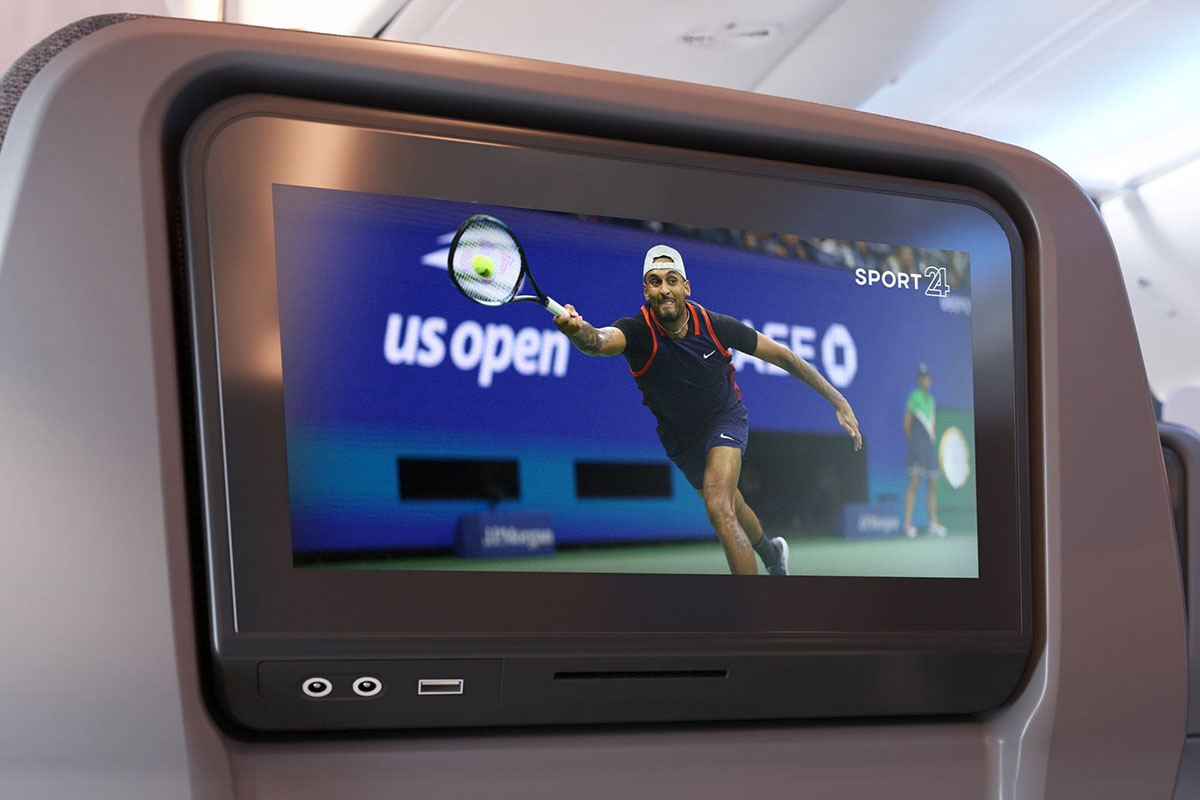
Singapore Airlines also offers its Live TV service on aircraft equipped with the Panasonic connectivity system, allowing you to watch live sporting events or catch up on the latest news coverage.
See our full guide to the carrier’s Live TV service, which outlines the available content, aircraft types and route availability.
Summary
SIA’s Wi-Fi offering and pricing has come on leaps and bounds over the last few years.
It’s amazing to think that in January 2019 the airline was charging Business Class passengers US$15 to top up their 30MB free allowance by a measly 60MB, but is now offering unlimited full-flight Wi-Fi fleet-wide to all passengers on board, for up to three devices at once in some cases.
Indeed SIA became the first airline in Asia-Pacific to offer unlimited free Wi-Fi to all passengers on international flights in 2023.
With the retirement of the Boeing 737-800 fleet in October 2025, every Singapore Airlines aircraft now has Wi-Fi capability.
Those flying in Economy and Premium Economy will still need to be KrisFlyer or PPS Club members to benefit, or sign-up to KrisFlyer and add the membership details to their booking prior to their flight. Passengers in Business Class, First Class or Suites get complimentary Wi-Fi automatically, regardless of frequent flyer programme.
Looking ahead, the confirmed rollout of Starlink from Q1 2027 on selected A350 LH, A350 ULR and A380 aircraft, plus almost inevitably the 777-9s, will deliver a significant step change in connectivity speed, latency and gate-to-gate availability, though the rollout window stretches to late-2029 and several aircraft types are excluded, so the existing Ku-/Ka-band systems will remain in service across much of the fleet for years to come.
Further details of SIA’s inflight Wi-Fi service are available here.
(Cover Photo: Joi Ito)
It is possible to watch YouTube videos through inflight wifi. You just need to use a VPN. Doing so also increases your download and upload speeds for some weird reason.