

One of the more common questions we’re asked by readers is whether there is any way to transfer KrisFlyer miles to another member. In short there isn’t – SIA offers no transfer function, no pooling and no household account option like some other programmes. What it offers instead is the KrisFlyer redemption nominee system.
This lets you choose up to five named individuals, and use your miles to book award tickets and upgrades for them just as easily as you can for yourself.
It’s a system with a few tricky restrictions though – a six-month lock on each nominee, a fee to remove them, and a 72-hour restriction that can catch you out when a last-minute trip comes up.
Here’s how it all works – including several things we’ve tested directly, because SIA’s own documentation doesn’t always answer them too clearly.
Why the system exists at all
Plenty of frequent flyer programmes let you redeem flights for anyone you like, like the British Airways Avios programme. KrisFlyer doesn’t, and the reason is miles brokering.
Award tickets in SIA’s premium cabins are valuable enough that a grey market has long existed for them, with brokers acquiring members’ miles below their worth, then charging a premium for the seats those miles unlock. If any member could redeem for any passenger, that trade would flourish.

(Photo: MainlyMiles)
Restricting redemptions to a fixed list of five named people, each locked in for six months at a time and with a fee to change them in most cases, makes brokering considerably more awkward. It doesn’t completely eliminate it, but it makes it more limited, and more difficult to achieve.
The trade-off is that ordinary members – the overwhelming majority of us simply wanting to book a flight for a partner, friend or parent – have to plan a little more carefully and further ahead than we otherwise might like.
Who can be a redemption nominee?
Anyone at all! There’s no requirement for a family relationship, no need to prove a connection, and no obligation for the nominee to travel with you. Your nominees can be your spouse, your children, your parents, your friends, your colleagues or your neighbours.
The restrictions are narrow:
- Five at any one time. Status buys you nothing here – Solitaire PPS Club members work with the same five slots as a brand new KrisFlyer member.
- Children count as full nominees. A two-year-old occupies a slot exactly as an adult does.
- Minimum age two at the date of travel.
You’ll need your nominee’s passport to hand. SIA asks for the title and family name, given name, date of birth, passport number, passport place of issue and passport expiry date, so this isn’t something you can fill in from memory with a name and a birthday.
In fairness Singapore Airlines can’t verify at this stage that the passport details you’ve entered (number, expiry date) are accurate, and you can edit them later free of charge. On most routes it makes no difference if the nominee turns up at check-in with a different passport, though it will matter where advance passenger information is required, such as flights to the US or Australia.
There’s also a field for their KrisFlyer membership number (if they have one, it’s not compulsory), and a yes/no question on whether they’re resident in the European Economic Area, United Kingdom, Switzerland or Turkey.
Names must match the passport exactly, and it pays to get this right first time – as we’ll come to, the supporting details can be edited later but the name cannot.
This is a bit easier if the nominee is a KrisFlyer member and you enter their number at the addition stage, because it immediately tells you if the name doesn’t match the KrisFlyer account, and flatly refuses to add the nominee until it does – or until you remove the KrisFlyer number from the form.
What you can actually do with a nominee
Once someone is on your list, your miles can be used for:
- Award tickets for them on Singapore Airlines, Star Alliance partners and SIA’s other redemption partners
- Flight upgrades for them on Singapore Airlines
- Paying for their Singapore Airlines ticket with miles when you book online

(Photo: Shutterstock)
How to add a redemption nominee
The whole thing is handled online and takes a couple of minutes.
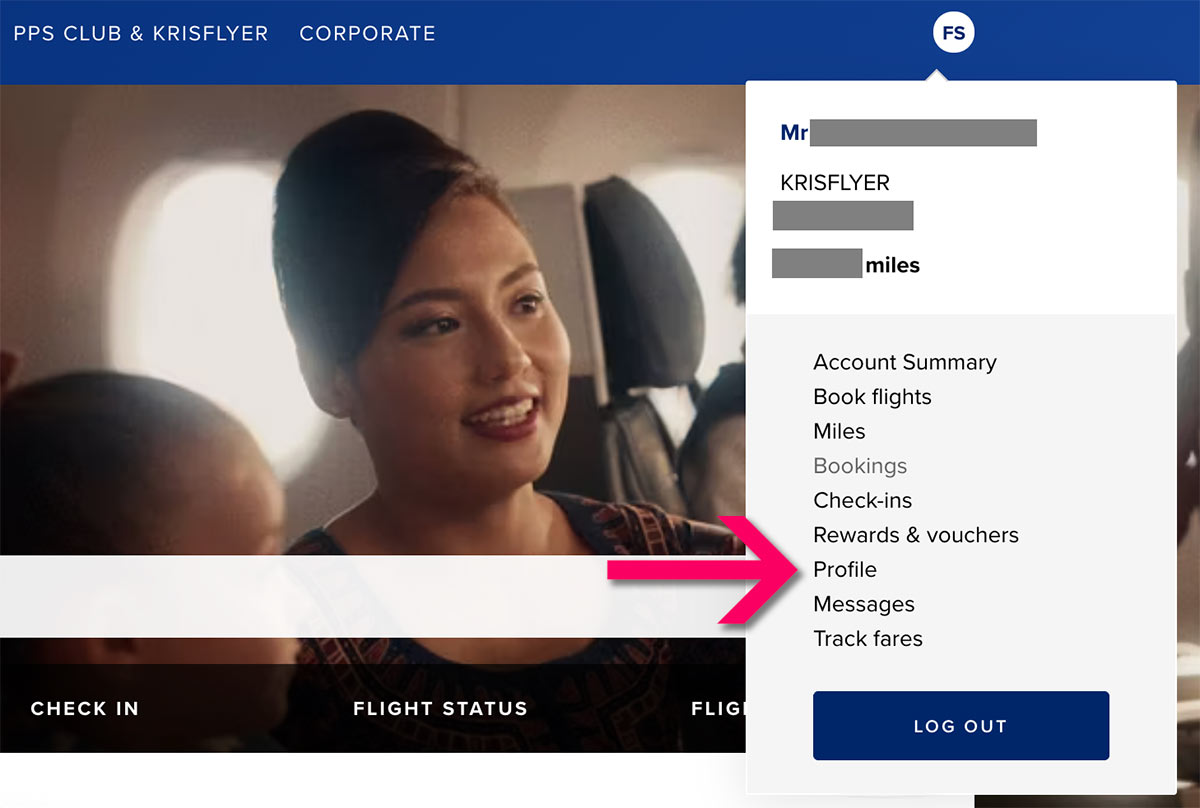
Log in to your KrisFlyer account, click the circle with your initials at the top right, then choose Profile.
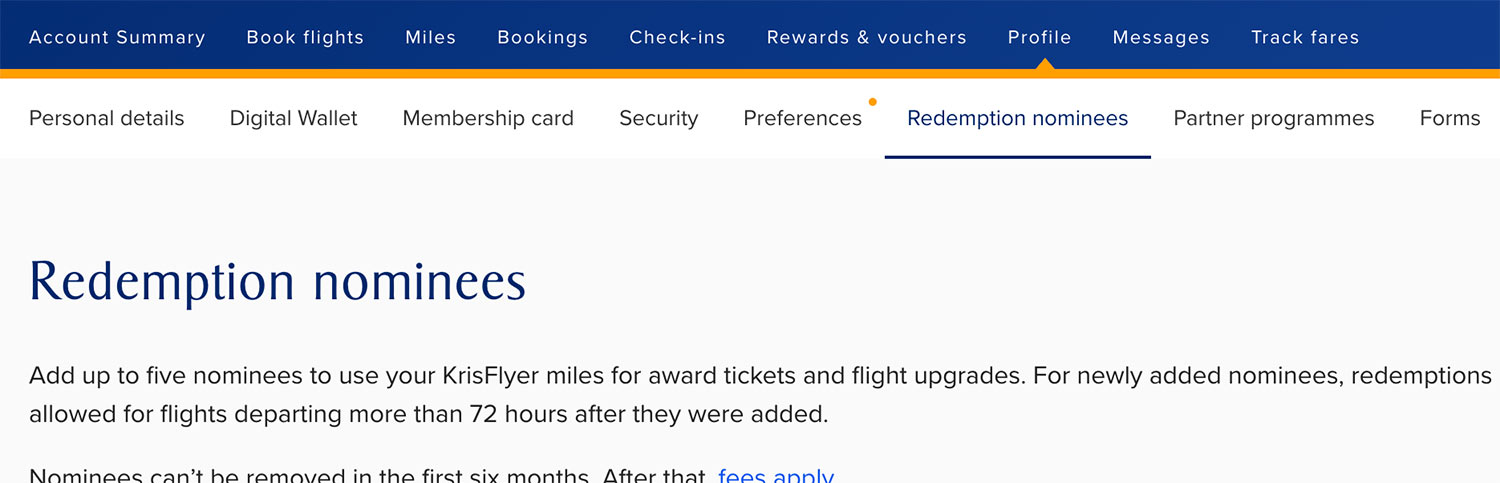
After that, click Redemption nominees from the row of tabs.
Your existing nominees are listed there, each showing a “Nominee since” date. That’s the one to take note of, because it’s what determines when the six-month lock expires on any individual.
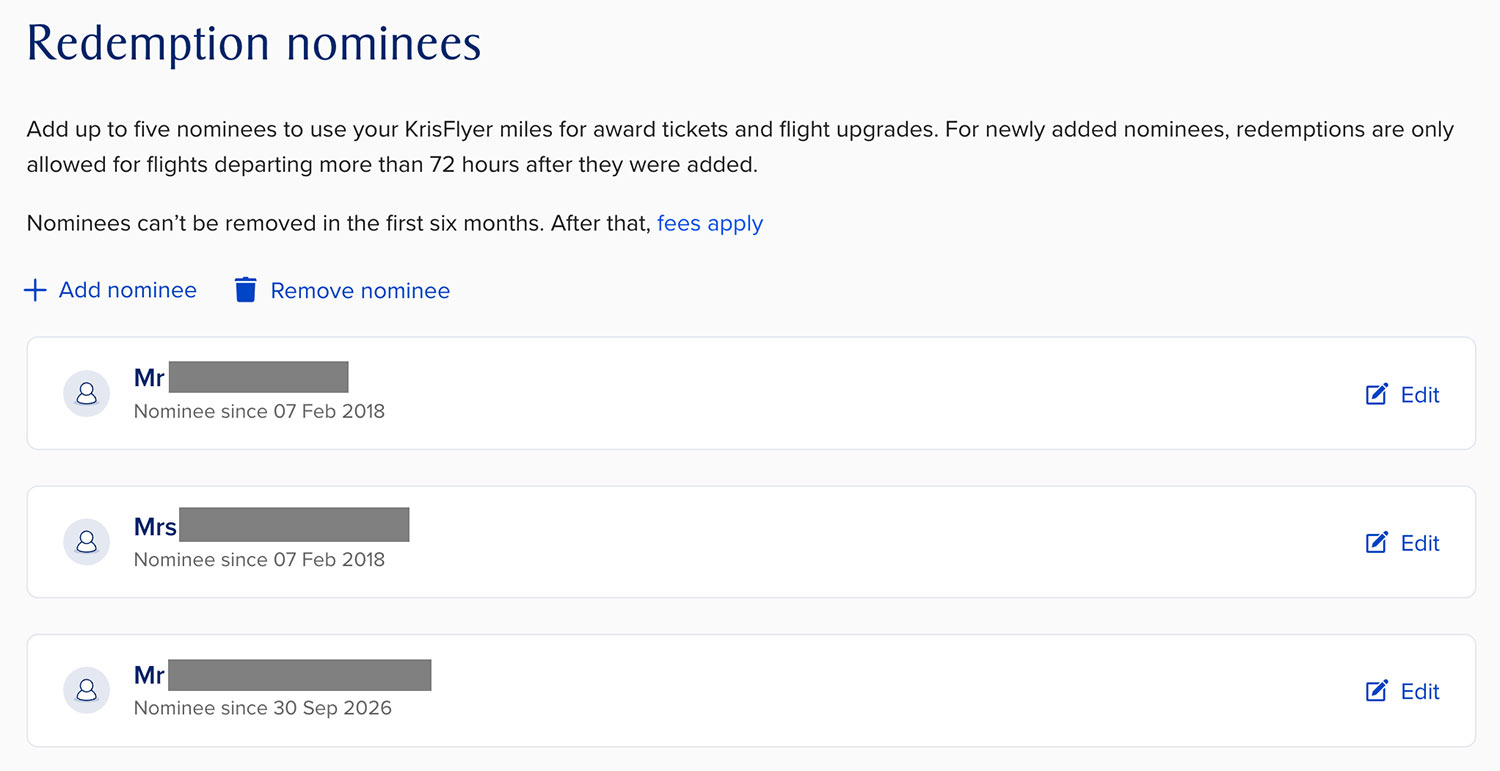
Two options sit above the list:
- Add nominee – free, and available whenever you have a slot spare
- Remove nominee – opens a panel of everyone eligible for removal, subject to the fee and lock rules covered below
Each nominee also carries an Edit link on their own row, for updating the information held against them. A fees apply link in the page text opens SIA’s charging table.
Choose Add nominee, enter the details from their passport, and save. They appear on your list immediately.
The 72-hour rule
This is the one that can catch people out, and it’s probably the least well understood of the nominee rules.
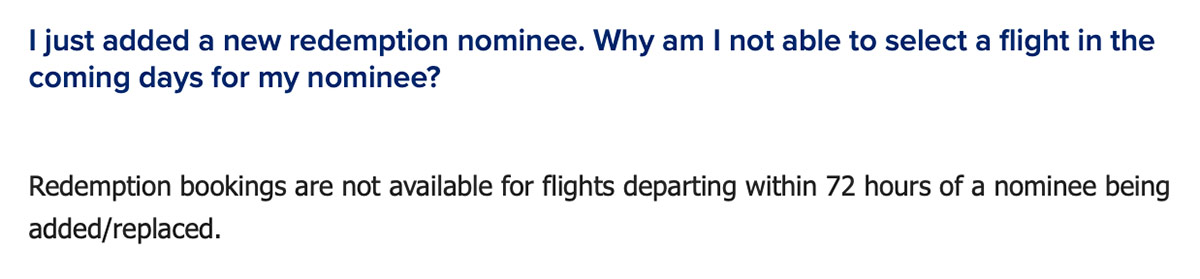
When you add a new nominee, or replace an existing one, you can only redeem flights for them that are departing more than 72 hours after the moment they were added.
The critical word is departing. This is not a waiting period on the nominee themselves.
Add someone at 2pm on a Monday and you can immediately book them onto a flight leaving next month, or next year. What you can’t do is book them onto anything leaving before 2pm on the Thursday of the same week.
To put it another way:
| How the 72-hour rule applies | ||
| Nominee added | Flight departs | Can you redeem? |
| Last month | In four hours | Yes |
| Today | Tomorrow morning | No |
| Today | In two days | No |
| Today | In four days | Yes |
| Today | In six months | Yes |
An established nominee is never subject to the restriction. Once someone has been on your list for more than three days, you can book them onto the next flight out in three hours’ time, if there’s award space.

One useful detail sits in the terms and conditions rather than the FAQs.
SIA doesn’t describe the 72-hour window as an absolute bar. Instead, redemptions inside it are “subject to SIA’s sole discretion and will be assessed by SIA on a case-by-case basis”. So if you’re facing an urgent booking need with a newly added nominee, it’s worth a call to KrisFlyer Membership Services, rather than assuming the door is closed.
This isn’t a new rule, incidentally, though SIA only added it to the redemption FAQs in August 2026. It has been sitting on the redemption nominees page in your KrisFlyer account for some time.
The six-month lock
Adding a nominee is free, and can be done at any time. Getting rid of one is neither.
The rule is straightforward enough – once someone is on your list, you can’t remove them for six months.
That’s per person, measured from the date they were added, which the website shows you. When you open the Remove nominee panel, only those you’ve held for six months or more appear as options – anyone more recent simply isn’t listed, so there’s no way to hit the restriction by accident.
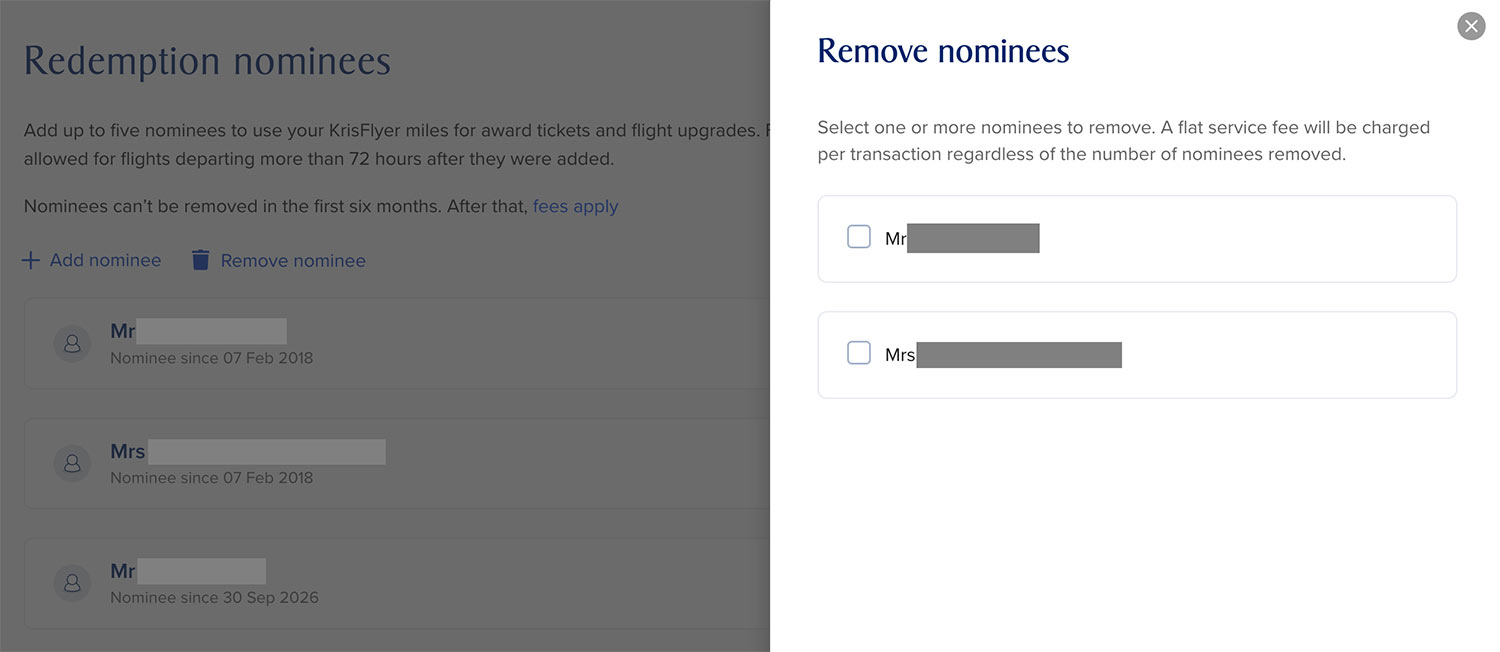
SIA’s terms put it less helpfully, saying that once you’ve removed a nominee you “can’t make any further changes for six months”, which reads as though taking one person off freezes the whole list for half a year. Don’t worry – it doesn’t.
The only restriction is the six-month clock on each individual – you can continue to add new nominees (if you have spare slots) and remove others that have been on the list more than six months, even after removing someone.
There’s also another clause to be aware of, even though it rarely affects members.
SIA reserves up to six weeks from receipt for an addition, replacement or deletion to become effective. In practice it’s instant – our own additions and deletions as recently as this week have always taken effect the moment they were confirmed – but the clause exists, and it’s a good reason not to leave a nominee addition to the last minute before you have a redemption planned.
What it costs to remove a nominee
Adding is free. Removing someone is not, unless you hold Elite Gold status or above.
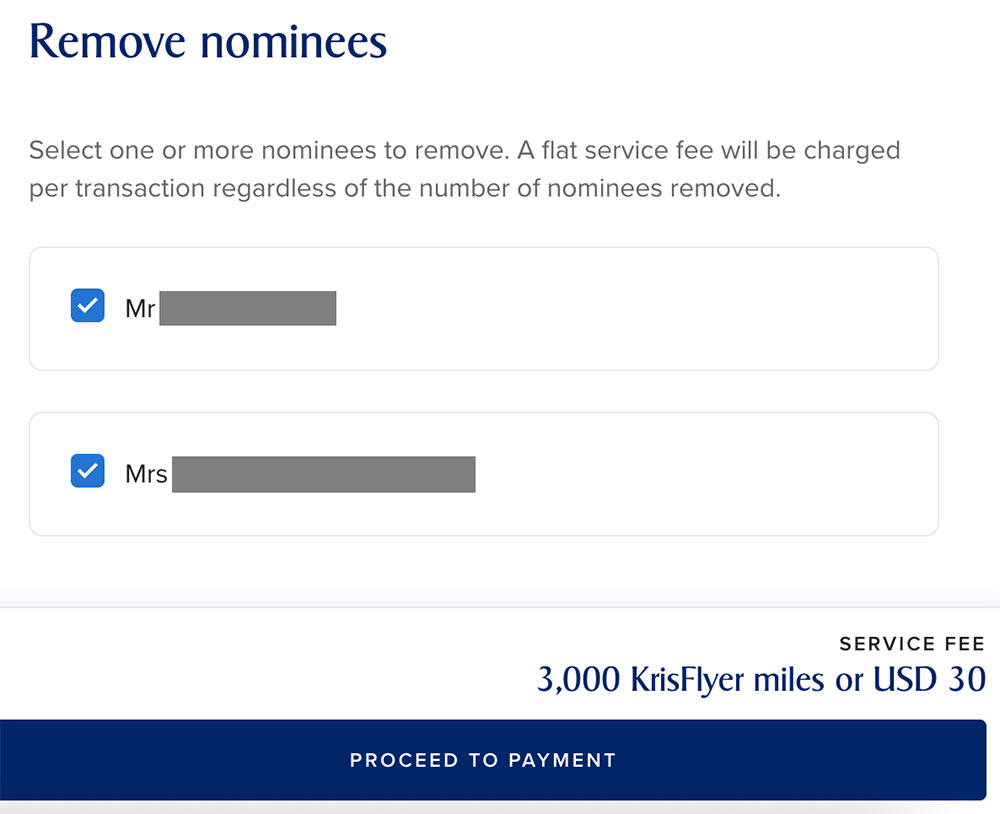
Choosing Remove nominee opens a panel listing everyone eligible, with a checkbox against each. Tick as many as you want, and the service fee shown at the foot of the panel stays the same. SIA spells it out there explicitly, confirming that a flat fee applies per transaction regardless of how many nominees you remove.
The fee is flat per transaction, not per nominee, so a single removal and a clear-out of your entire list carry an identical charge, provided you do it in one go. We’ve confirmed that in practice – deleting two nominees together produced a single 3,000 miles / US$30 charge for a basic KrisFlyer member, with both names on one confirmation screen.
One thing you don’t need to worry about – removing someone from your list won’t touch any award ticket you’ve already booked for them. What matters is that they were a nominee when you made the redemption – after that the ticket is theirs and they can still travel on it long after they’ve been removed.
That’s good to know if you’re clearing slots while a nominee you are removing still has an unflown award ticket to travel on at a future date.
| Fee to remove redemption nominees | ||
| Membership tier | Online | Offline |
 KF KF |
3,000 miles or US$30 |
5,500 miles or US$55 |
 KF Elite Silver KF Elite Silver |
1,500 miles or US$15 |
4,000 miles or US$40 |
 KF Elite Gold KF Elite Gold |
Free | 2,500 miles or US$25 |
 PPS Club PPS ClubSolitaire PPS |
Free | Free |
As the table shows – always do it online! The offline fee can be more than double the online one, and it’s the difference between free and 2,500 miles for Elite Gold members. Only PPS Club and Solitaire PPS Club members escape the penalty, and even then there’s no advantage we can think of to doing it offline, unless you run into a technical snag.
Always pay cash, not miles. SIA offers you the choice at the payment stage, and for a basic KrisFlyer member that’s around S$38 (US$30 at current exchange rates). The alternative is 3,000 miles, worth around S$54 at a typical valuation of 1.8 cents each against future flight redemptions.
Put another way, SIA is valuing your miles at 1 US cent (roughly 1.28 Singapore cents) when you hand them over for this, and you can do considerably better than that spending them on a flight. The same gap applies wherever a fee is payable.
Worth noting too that the fee is set in US dollars and converted at the time of payment, so the exact figure in Singapore dollars moves with the exchange rate.

So what’s a “replacement”?
Another quirk of SIA’s language for the nominee system – the terms talk throughout about “replacing” a nominee, but hang on… there is no “replace” function.
The Edit option only updates the information held against someone – for example their passport details – and specifically will not allow a name change. A replacement is therefore a deletion, followed by an addition – one fee on the way out, no fee on the way in.
That also means the incoming nominee’s 72-hour clock starts when they’re added, not when the outgoing nominee was removed, even if the new nominee “took their place”.
Authorised nominees: think before you tick
When you add a nominee, you can choose to authorise them, but what does that mean?
An authorised nominee can make and change bookings for themselves and on your behalf, drawing on your miles, once they’ve passed SIA’s verification. Additionally, per SIA’s own terms, the airline won’t notify you and won’t accept liability for tickets issued to an authorised nominee.
In other words, you’re handing someone else spending authority over your miles balance with no notification when they use it.
For most members there’s no reason to enable this. You can book for your nominees perfectly well yourself. The obvious exception is a family member who needs to manage their own travel – for example an adult child studying abroad, or perhaps a parent who’d rather deal with the airline directly.
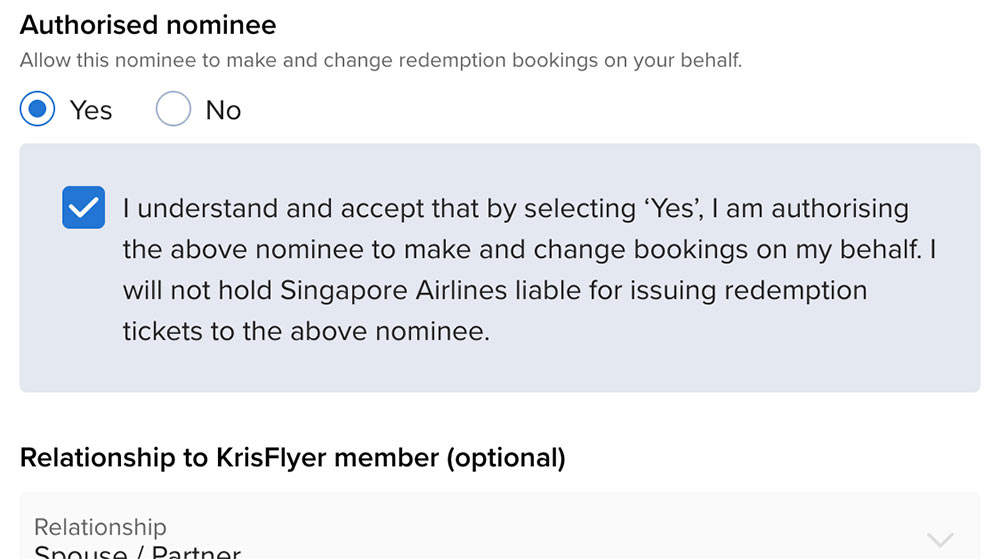
SIA’s terms don’t say whether switching authorisation on or off counts as a “change” to your list, with the fee and six-month freeze that might imply.
We’ve tested it in both directions, and it doesn’t. You can grant authorisation to an existing nominee and withdraw it again at no cost, with no effect on the list – so there’s no need to get this decision right or even consider it permanent at the moment you add someone.
That could be useful if for example you just want to trust a nominee to make a single booking for themselves – let’s say tomorrow when you will be too busy to do it for them – then remove the authorisation after that, so you’re not giving them long-term access to this function.
Children, infants and unaccompanied minors
A child nominee is treated identically to an adult in almost every respect. They occupy one of your five slots, they must be at least two years old at the date of travel, and – the part that surprises most people – they cost the same number of miles when you redeem.
There’s no child discount on KrisFlyer award redemptions. A four-year-old in Business Class to London costs precisely what an adult does.

(Photo: Singapore Airlines)
If your nominee is under 12, you can redeem for them online provided they’re travelling accompanied. For an unaccompanied minor, the booking has to go through KrisFlyer Membership Services.
Infants under two are a different matter. Travelling on a lap they don’t occupy a seat, so there’s no redemption to make and no nominee slot required – you’ll pay a percentage of the adult fare in cash instead. If you want an infant in their own seat you’d be paying the full adult mileage anyway, in which case they do need a nominee slot, and must have turned two by the travel date.
Not to be confused with KrisFlyer for Families
There is one place where KrisFlyer does allow miles to move between accounts, and there’s potential for it to be mistaken for the nominee system.
KrisFlyer for Families lets a parent or guardian link their account to a child’s and pull the child’s miles across into their own. That’s an actual miles transfer between accounts, and it’s the only one KrisFlyer offers.
The two systems do entirely different jobs.
- Redemption nominees let you spend your miles on someone else. Nothing moves between accounts.
- KrisFlyer for Families moves miles out of a child’s account and into yours. Nothing is spent.
They’re complements rather than alternatives, and there’s no reason not to use both. Your child can be linked to your account under KrisFlyer for Families and sit on your nominee list, so their flown miles come to you and your miles can book their award tickets.
The headline restrictions are that transfers run one way only, from child to parent, they’re capped at 50,000 miles per calendar year, and the link dissolves automatically when the child turns 16. There’s also a fee of US$5 or 500 miles for every 5,000 miles moved, charged per block or part thereof. Unusually, status makes no difference here – even Solitaire PPS Club members pay it in full.
That fee is usually what decides which system to use. If your child has a sizeable balance, you’re better off adding yourself as a redemption nominee on their account and redeeming from it directly, rather than paying to shift the miles across. The transfer earns its keep when you’re short for a specific redemption and their balance is modest.
Our tips
Don’t fill all five redemption nominee slots just because you can. Adding is free, but every name you add is a name you may have to pay to remove later. Fill the slots you need, and leave the rest empty.
Add people before you need them. Additions are free, instant, and can be made at any time regardless of what else you’ve done to your list recently. If there’s someone you might plausibly redeem for in the next year, there’s no reason not to add them today – and it avoids the 72-hour rule scuppering your plans when a last-minute trip comes up.
Think about the household as a whole. If your partner also holds a KrisFlyer account, that’s ten nominee slots between you rather than five. Splitting regular travellers across both lists gives you far more flexibility than loading everyone onto one account, or the same people into both.
Time your clear-out around your status. If you’re within reach of Elite Gold, deletions become free online once you get there. A nominee reshuffle you can defer for a few months might save you money or miles. On the flip side, if you’re about to lose Gold status, get your redemption nominee house in order before that happens, while it’s still free.
If you have children, run both systems. Add them as nominees so your miles can book their seats, and link their accounts under KrisFlyer for Families so the miles they earn flying end up somewhere useful. Remember the link breaks automatically at 16, so there’s a deadline on that.
Keep one slot flexible. Permanent nominees – spouse, children, parents – are unlikely to change. Reserving a slot or two for whoever comes up avoids a paid deletion when a friend asks whether you can help out with a flight.
Summary
The redemption nominee system is KrisFlyer’s answer to a question most programmes solve with transfers or pooling, and on balance it’s not a bad one. Five people, anyone you like, no relationship test, and no fee to add them.
The hassle, and cost, is all in the changes.
The six-month lock and the deletion fee mean your list needs some forethought rather than being something you reshuffle on a whim, and the 72-hour rule means a brand new nominee can’t be part of a last-minute escape, with or without you.
None of that is onerous if you set the list up sensibly and leave it alone. Simply add the people you’d realistically redeem for, do it well before you need to, and the system mostly runs along nicely in the background – which, for what is effectively a set of anti-brokering rules, is probably about the best we can hope for.
(Cover Photo: Singapore Airlines)